Alax.Info ScreenShot Shell Extensions extend windows shell to provide a helpful command to work with screenshots. A new command “Paste Image as PNG File…” is added to directory context menus when clipboard contains an image.
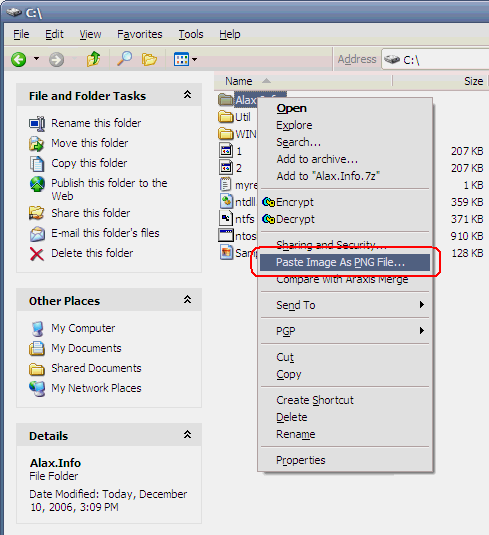
User will be prompted to enter file name for the saved image. Should Control key be pressed at the moment of command invocation, the shell extension will auto-name the file using ImageNNN.png format, where NNN is an auto incremented number.
Images are saved in PNG (Portable Network Graphics) format with an automatic color depth reduction to create more compact images for web.
The extension is designed to work with Windows hotkeys PrintScreen and Alt+PrintScreen, which copy a shot of screen or active window into clipboard. The image becomes pasteable into file with this shell extension.
Application Name: Alax.Info ScreenShot Shell Extensions
License: Free for personal use, request commercial licenses via email or contact form
Latest Version: 1.0.0.42
Download Link: Alax.Info ScreenShot Shell Extensions 1.0.0.42 (237K)
Wow. Once again quite a useful thing :-)
That’s great you are creating these small useful apps!
Ilya, these are among things I use on a daily basis, I have been using this PNG extension for maybe a couple of years already.
I decided to make some of the goodies easy installable and put them online. Hopefully there will be more.