Inspired by a post on DirectShow Development Forum, it is sometimes useful to find out how certain application is using DirectShow to capture live video and/or audio, or play certain file etc. Filter graph topology, details about media types on the pins, used interfaces and call order. There is quite an easy step for the developer to spy over running filter graphs system wide by connecting Component Object Model (COM) “Treat As” feature with filter graph remoting through Running Object Table and connecting to remote process graphs using GraphEdit utility. Who could imagine Windows Media Player to build such a filter graph for a video and audio Windows Media file? SRS Wow DMO, equalizer, analyzer and stuff? 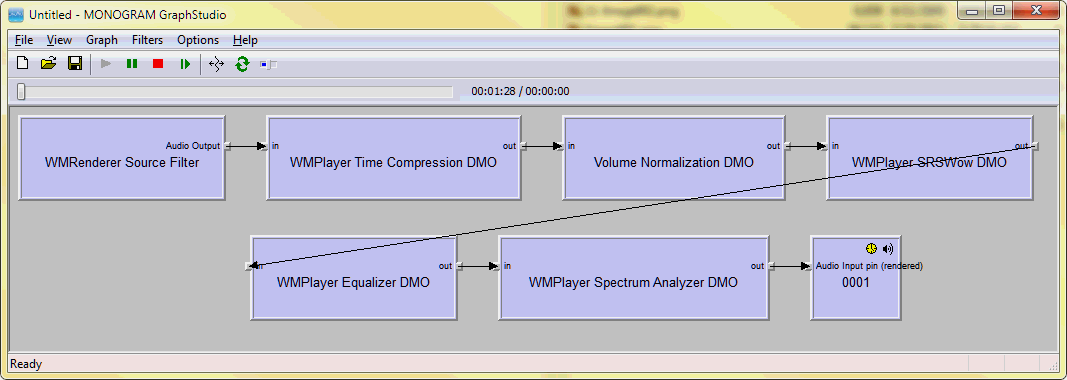 There are many tricks to catch the created filter graph but the most legit is the mentioned above “Treat As” feature to emulate certain COM class identifier (CLSID) through another coclass. COM API offers
CoTreatAsClass and CoGetTreatAsClass functions to manage the emulation. To emulate DirectShow’s CLSID_FilterGraph through my CSpy class, I am adding the following code to the default COM registration process for the utility DLL:
static HRESULT WINAPI UpdateRegistry(BOOL bRegister) throw()
{
    _Z2(atlTraceRegistrar, 2, _T("bRegister %d\n"), bRegister);
    _ATLTRY
    {
        CLSID TreatAsClassIdentifier;
        HRESULT nCoGetTreatAsClassResult = CoGetTreatAsClass(CLSID_FilterGraph, &TreatAsClassIdentifier);
        __C(nCoGetTreatAsClassResult);
        __D(!bRegister || nCoGetTreatAsClassResult != S_OK || TreatAsClassIdentifier == GetObjectCLSID(), E_UNNAMED);
        if(!bRegister && nCoGetTreatAsClassResult == S_OK)
            __C(CoTreatAsClass(CLSID_FilterGraph, CLSID_NULL));
        _A(_pAtlModule);
        UpdateRegistryFromResource<CSpy>(bRegister);
        if(bRegister)
            __C(CoTreatAsClass(CLSID_FilterGraph, GetObjectCLSID()));
    }
    _ATLCATCH(Exception)
    {
        _C(Exception);
    }
    return S_OK;
}
The idea is that the emulation is enabled in case it was not enabled before or it was already enabled through our coclass. Every time an application cocreates an instance of Filter Graph Manager (FGM), CSpy class will be created instead. Still as we have no plans to reinvent one of the most important DirectShow objects, we have to embed the original FGM insde to forward the calls to. The proper place in the ATL C++ code is FinalConstruct and what we actually do there is instantiating an aggregated FGM from the original in-process server. The safest would be to query registry for the original host, but we know it’s hosted by quartz.dll and it seems to be safe to hardcode:
HINSTANCE hModule = CoLoadLibrary(_T("quartz.dll"), TRUE);
_ATLTRY
{
    typedef HRESULT (WINAPI *DLLGETCLASSOBJECT)(REFCLSID, REFIID, VOID**);
    DLLGETCLASSOBJECT DllGetClassObject = (DLLGETCLASSOBJECT) GetProcAddress(hModule, "DllGetClassObject");
    __E(DllGetClassObject);
    CComPtr<IClassFactory> pClassFactory;
    __C(DllGetClassObject(CLSID_FilterGraph, __uuidof(IClassFactory), (VOID**) &pClassFactory));
    _A(pClassFactory);
    CComPtr<IUnknown> pUnknown;
    __C(pClassFactory->CreateInstance(GetControllingUnknown(), __uuidof(IUnknown), (VOID**) &pUnknown));
    CComQIPtr<IFilterGraph2> pFilterGraph2 = pUnknown;
    __D(pFilterGraph2, E_NOINTERFACE);
What is remained at the point is to implement IFilterGraph2 (along with inherited IGraphBuilder and IFilterGraph) and forward all incoming calls to the inner aggregated object. It would also be helpful to trace calls to a log file C:\FilterGraphSpy.log:
2009-01-28 22:07:51    4456    5656    dllmain.h(29): CFilterGraphSpyModule::CFilterGraphSpyModule: this 0x01cd327c
2009-01-28 22:07:51 4456    5656    Spy.h(75): CSpy::CSpy: this 0x01ce297c
2009-01-28 22:07:51 4456    5656    Spy.h(132): CSpy::AddFilter: pszName "C:\Documents and Settings\John Doe\Desktop\Melissa Cherry Interview.wmv"
2009-01-28 22:07:51 4456    5656    Spy.h(142): CSpy::EnumFilters: ...
2009-01-28 22:07:51 4456    5656    Spy.h(132): CSpy::AddFilter: pszName "ffdshow Audio Decoder"
2009-01-28 22:07:51 4456    5656    Spy.h(152): CSpy::ConnectDirect: ...
2009-01-28 22:07:51 4456    5656    Spy.h(137): CSpy::RemoveFilter: ...
2009-01-28 22:07:51 4456    5656    Spy.h(132): CSpy::AddFilter: pszName "WMAudio Decoder DMO"
2009-01-28 22:07:51 4456    5656    Spy.h(152): CSpy::ConnectDirect: ...
2009-01-28 22:07:51 4456    5656    Spy.h(142): CSpy::EnumFilters: ...
And additionally, the filter graph is immediately published on the ROT and is accessible with
GraphEdit. Feel free to spy over graphs system wide. A partial Visual C++ .NET 2008 source code is available from SVN (outdated!), release binary included.
- Download the binary DLL from version control repository (DirectShowSpy.dll – Win32, x64), get also helper .BAT files here.
- COM register the DLL on target system, for example from command line using regsvr32 utility “regsvr32 DirectShowSpy.dll” (administrative privilege elevation required on Vista)
- On Vista/7 operating systems it is also required to make SDK proppage.dll library available and registered in the system, see Vista related post for more details
To uninstall:
- use “regsvr32 /u” utility to unregister the DLL, close all DirectShow based applications or reboot OS, and delete the file; see also a related thread on MSDN Forums
A transcript of related chat:
Yes you need to regsvr32 and from this point all new filter graphs should be available on running object table so that you connect to them as to remote graphs using GraphEdit
I don’t think so, but there is another possible cause. Did you at all see any remote graphs using Graph Edit? After upgrading to XP SP3 you might need to run “regsvr32 quartz.dll” to get the ability for GraphEdit to see remote graphs back again
ok, so try regsvr32 quartz.dll from windows\system32 folder and see it this is helpful for both my dll and your apps
if you can’t see your own graphs with graphedit through ROT, then there is definitely some problem… as for my dll, except for ROT you can check generated log file in C:\ProgramData (this is hidden dir) if you see it’s populating then my dll is intercepting filter graph instantiations
OK, there may be something different on Vista (I am using XP but I was pretty sure it is the same way on Vista) or wrong with the system since you don’t see remote graphs
BTW you need to regsvr32 from elevated admin command prompt (this is to make sure).
e.g. there is “CSpy::EnumFilters: …” which means that it actually worked
there is no other way for these lines to appear in the log other than if the graph is hooked by my dll and it is intercepting all filter graphs
BTW if you run MEdia Player Classic, it also publishes its graph on ROT
and with my DLL you will have two entries there, both point to the same graph
From a chat:
First of all, Windows Media Player might be inserting another filter, which other players don’t insert, and this breaks WMP seeking. You can see WMP’s filter graph using my Filter Graph Spy utility.
A second possible reason is that you don’t fully (for some reason) implement seeking, in which case you should have some weird method called on your filter, what other players don’t do. Or – another interface is queried from your filter, you don’t implement it and return E_NOINTERFACE and that’s all, you don’t receive other calls.
I have not published them, please use binary – it is also in SVN.
regsvr32 /u FilterGraphSpy.dll
from command line, then try to delete file (if it is still locked, reboot and delete after that). If this does not help, you have other issues in your system that result in your inability to debug.
Several of your projects include “roatltrace.h” your replacement for . Where is this file, or what are the differences between yours and the original?
This my file I never yet published.
I’m making a filter that uses TreatAs to hook an existing IBaseFilter derived filter using the same approach as your example (load lib, reflect calls, etc.), and it all works great as long as I return the inner filter’s IBaseFilter (and its base interfaces) when queried (all other queries are passed to the inner object).
I.e. this works:
…
COM_INTERFACE_ENTRY_FUNC(IID_IBaseFilter, NULL, CFilter::GetBaseFilter)
COM_INTERFACE_ENTRY_AGGREGATE_BLIND(m_pInnerUnknown)
…
static HRESULT WINAPI GetBaseFilter(void* pv, REFIID riid, LPVOID* ppv, DWORD dw) throw()
{
CFilter* pFilter = reinterpret_cast(pv);
*ppv = m_pInnerBaseFilter;
return S_OK;
}
But if I return the reflecting IBaseFilter interface when queried, it works fine in GraphStudio and GraphEdit, but crashes in WMPlayer when the graph is released.
I.e. this doesn’t work:
…
COM_INTERFACE_ENTRY(IBaseFilter)
COM_INTERFACE_ENTRY(IMediaFilter)
COM_INTERFACE_ENTRY(IPersist)
COM_INTERFACE_ENTRY_AGGREGATE_BLIND(m_pInnerUnknown)
…
// reflected interface methods…
STDMETHODIMP EnumPins(IEnumPins **ppEnum)
{ return m_pInnerBaseFilter->EnumPins(ppEnum); }
… etc.
In both cases, I’m using the same mechanism to load and query the interface on the inner filter object in FinalContruct:
CComQIPtr pBaseFilter = pUnknown;
pBaseFilter.p->Release();
m_pInnerUnknown = pUnknown;
m_pInnerBaseFilter = pBaseFilter;
It look like a refcount is off, but I’ve tried bumping the counts to avoid a delete, and it still crashes. Btw, when I bump the counts, GraphEdit reports unreleased objects.
Do you have any insights as to why the filter might work fine in one app, but not in another?
Also, why does your CSpy reflect the IMediaControl interface? Is this just to get more info, or is there another reason?
With an access violation during destruction, the most likely cause is reference counting. You should probably see how you are destroying your object and then receive another call on its interface. And when you return original IBaseFilter you probably don’t have any reflecting code remained, other than instantiation and QueryInterface. Are you aggregating the filter you are hooking? Basically BaseClasses are not 100% COM compliant (they are coming from long ago and nobody cared to fix this compliance since then).
So if you are aggregating, the might be some [small] issues in COM aggregation compliance, and if you are not aggregating, or the filter you are hooking does not support aggregation, then you must hook all interfaces of interest so that you never expose original one, including those of pins.
The difference between applications might be in an order of calls. For example, some application can obtain pin’s interface and then through it get owner filter interface and keep it so that it is released the last. If you are not aggregating, this can lead to situation when you already have no interface pointers outstanding and your filter is destroyed, while application still hold a reference to your inner object.
It is not essential to hook this interface for ROT stuff, but additionally to ROT the spy logs all graph calls to log file and here is where it is also convenient to log IMediaControl method calls: Run, Stop etc.
Thanks for the suggestions. It was a refcount issue due to the filter being held by its pins. I had to catch all the points where the inner filter was being returned and handle those interfaces too. Works great now.
Note that the binary was renamed from FilterGraphSpy.dll to DirectShowSpy.dll.
Will you please release roatltrace.h?
Can I hook a/v data from filter graph?
if it is possible, how can i do it?
please help me!
You can by inserting your own filter in between. So that your filter could act as a “middleman”. This is not always possible/easy and it’s rather addressing specific graph rather than universal solution, but this is possible.
Thanks for your reply.
i have made my sample grabber filter.
now i wanna put it in the filter graph, and connect to video capture filter.
but capture filter is already connected other filter in his application. how can i get video capture data in the other’s application?
Let’s start from understanding that the application you want to hook to is not expecting a sample grabber, OK?
First of all for this reason something may not work out. If you would like to hook once – it’s OK, but if you would like to ship this hook as production code – then it’s a no-no.
If it’s another application, and you are in context of calling process, you can use spy’s hook capability: you can provide your COM class and receive OnConnect, OnPause, OnRun calls intercepted by spy and passed to your class.
Your class will check the process where it’s in, possibly check graphs and insert your sample grabber.
On SVN I have BdaHooks project which demonstrates how you can hook: http://www.assembla.com/code/roatl-utilities/subversion/nodes/trunk/FilterGraphSpy/BdaHooks
For example, here http://www.assembla.com/code/roatl-utilities/subversion/nodes/trunk/FilterGraphSpy/BdaHooks/StateControlHook.h#ln69 it intercepts OnRun just before the graph is run and it’s a good time to update graph and insert your filter htere.
thanks!
Roman,
Downloaded all 27 files in the BdaHooks from your link above then attempted to use Visual Studio 2005 to open BdaHooks.vcproj… Then see the following error message in VS2005:
—
The following error has occurred during XML parsing:
File: C:\Temp\BDAhook-Test\BdaHooks.vcproj Line: 13 Column: 9 Error Message: DTD is prohibited.
The file ‘C:\Temp\BDAhook-Test\BdaHooks.vcproj’ has failed to load.
Project upgrade failed.
—
VS 2005 Information:
Microsoft Visual Studio 2005
Version 8.0.50727.762 (SP.050727-7600)
Microsoft .NET Framework
Version 2.0.50727 SP2
Installed Edition: Professional
Microsoft Visual Basic 2005
Microsoft Visual C# 2005
Microsoft Visual C++ 2005
Microsoft Visual J# 2005
Microsoft Visual Web Developer 2005
Microsoft Web Application Projects 2005
Version 8.0.50727.762
Crystal Reports for Visual Studio 2005
Hotfix for Microsoft Visual Studio 2005 Professional Edition – ENU (KB949009)
This Hotfix is for Microsoft Visual Studio 2005 Professional Edition – ENU.
If you later install a more recent service pack, this Hotfix will be uninstalled automatically.
For more information, visit http://support.microsoft.com/kb/949009
Microsoft Visual C++ 2005 Express Edition – ENU Service Pack 1 (KB926748)
This service pack is for Microsoft Visual C++ 2005 Express Edition – ENU.
If you later install a more recent service pack, this service pack will be uninstalled automatically.
For more information, visit http://support.microsoft.com/kb/926748
Microsoft Visual Studio 2005 Professional Edition – ENU Service Pack 1 (KB926601)
This service pack is for Microsoft Visual Studio 2005 Professional Edition – ENU.
If you later install a more recent service pack, this service pack will be uninstalled automatically.
For more information, visit http://support.microsoft.com/kb/926601
Security Update for Microsoft Visual Studio 2005 Professional Edition – ENU (KB937061)
This Security Update is for Microsoft Visual Studio 2005 Professional Edition – ENU.
If you later install a more recent service pack, this Security Update will be uninstalled automatically.
For more information, visit http://support.microsoft.com/kb/937061
Security Update for Microsoft Visual Studio 2005 Professional Edition – ENU (KB947738)
This Security Update is for Microsoft Visual Studio 2005 Professional Edition – ENU.
If you later install a more recent service pack, this Security Update will be uninstalled automatically.
For more information, visit http://support.microsoft.com/kb/947738
Security Update for Microsoft Visual Studio 2005 Professional Edition – ENU (KB971023)
This Security Update is for Microsoft Visual Studio 2005 Professional Edition – ENU.
If you later install a more recent service pack, this Security Update will be uninstalled automatically.
For more information, visit http://support.microsoft.com/kb/971023
Security Update for Microsoft Visual Studio 2005 Professional Edition – ENU (KB971090)
This Security Update is for Microsoft Visual Studio 2005 Professional Edition – ENU.
If you later install a more recent service pack, this Security Update will be uninstalled automatically.
For more information, visit http://support.microsoft.com/kb/971090
Security Update for Microsoft Visual Studio 2005 Professional Edition – ENU (KB973673)
This Security Update is for Microsoft Visual Studio 2005 Professional Edition – ENU.
If you later install a more recent service pack, this Security Update will be uninstalled automatically.
For more information, visit http://support.microsoft.com/kb/973673
SQL Server Analysis Services
Microsoft SQL Server Analysis Services Designer
Version 9.00.4035.00
SQL Server Integration Services
Microsoft SQL Server Integration Services Designer
Version 9.00.4035.00
SQL Server Reporting Services
Microsoft SQL Server Reporting Services Designers
Version 9.00.4035.00
—
Can this be fixed quickly?
I need to test a DirectX Graph that isn’t performing correctly.
Thank You,
BillNew
Hi Bill,
First of all, do you actually need BdaHooks? It’s a sample if you need to quickly hook your code into graph and for troubleshooting you most often don’t need code, finding out what the graph exactly is is just fine.
If you need BdaHooks, you will need to create a new ATL project and copy files there. I don’t think there is anything special required, but I used VS 2008 and I don’t even have 2005 now for a check.
If you need to just discover what’s wrong with the graph, you have pre-built binaries for this. Here is what I normally do:
– register proppage.dll from Windows SDK
– register DirectShowSpy.dll
– start the app to be checked
– start GraphStudio and connect to remote graph, GraphStudio gets you all the details
– if you for some reason don’t see the graph or you cannot catch it as it’s released, DirectShowSpy.log will contain a print of graph structure with filters, connections and media types
Roman,
Thanks for the quick feedback… My browser messed up the download and added the DTD stuff in by mistake.
Did notice that it was using VS 2008 after I posted the message.
Will have to look for GraphStudio. Is this the correct link?
http://blog.monogram.sk/janos/tools/monogram-graphstudio/
Have a Very Complex DirectX Graph (that uses some Microsoft private licensed Codecs) that works perfectly except for Playback Speed on replaying an AVI File when using “Smart Tee”.
Found an article on MSDN that talked about replacing the “Smart Tee” Filter with “Infinite Pin Tee” Filter to correct the Playback Speed Issue when using AVI Files in a DirectX Graph.
http://social.msdn.microsoft.com/Forums/en-US/windowsdirectshowdevelopment/thread/e266e2e5-c42f-4e47-8ec2-c57870b62155
If I try to use “Infinite Pin Tee” Filter instead of “Smart Tee”, the graph doesn’t work properly.
Yet if using “Graph Edit” the graph works great and the AVI Playback Speed issue is solved.
So I have to try to figure out how and why the same graph works in “Graph Edit” then make the appropriate fixes in my program.
Thanks for the update,
BillNew
The link is correct, it’s a more convenient alternative to GraphEdit, and basically only lacks Graphedit’s frame step feature (frontend).
I am pretty sure that you don’t need Smart Tee filter for AVI playback, as it’s definitely for its own purpose. Instead you’d rather be checking why exactly Infinite Pin Tee filter is doing it wrong. It indeed can cause troubles due to its attempt to share allocators on its output pins and serialized processing.
Roman,
This is extremely useful… just wish that I would have found this when starting my project over a year ago… would have saved a LOT of headaches and a LOT of coding time.
Had some problems with Subversion Versions on DirectShowSpy.dll downloading properly. Finally got it to download… took way too long.
– A suggestion if I may: Add a Zip File for download of the DLL. This would make it a lot easier.
Your instructions today helped a lot:
Thanks for a great article and a very well done DLL that shows the very detailed DirectShow Graph items.
This will definitely help me correct my DirectX DirectShow Graph issues!
Thanks,
BillNew
OK, a ZIP might be a bit better thing, but it would take an additional step to publish it. So maybe it’s for later.
The links worked well but the SVN hoster (Assembla) is changing stuff frequently, so it seems they broke it, hopefully they will fix soon.
The reasons that we had “Smart Tee” in the graph is that we found that a similar graph to one that uses a Camera Input worked fine… and that we did not know about “Infinite Pin Tee” Filter.
Am still learning about DirectX Graphs… so the allocators and serialized processing is something that I really don’t know enough about.
Where would one go to find out more about Allocators and serialized processing for DirectX DirectShow Graphs?
Thanks,
BillNew
There are few sources to learn from.
* About Media Samples and Allocators — MDSN
* Infinite Pin Tee Filter — MSDN
* DirectShow Development — MSDN Forums
So basically it’s nothing new.
Roman,
Will look at the 3 nice links that you so gracefully provided… Thank you!
I am digging through the wonderful details that your DirectShow Graph Spy DLL program has produced for other areas in my programs that use DirectShow Graphs.
—
We are trying to have 2 different methods for sending data to our Video Graph.
– 1. Camera Input; and 2. Pre-recorded AVI Files.
A. Complex Graph using Web Camera for [Camera Input]:
[Camera Input] –> [Encode Codec] –> [Smart Tee]
[Smart Tee (Capture)] –> [Buffer Grabber]
[Smart Tee (Preview)] –> [Decode Codec] –> [Sample Grabber] –> [Color Space Converter] –> [Video Renderer]
*** This always works. ***
Sample Grabber is used to occasionally capture a Picture from the Web Camera based on a button press.
B. Replace [Camera Input] for Item A above with [File Source (Async) *] –> [AVI Splitter] –> [AVI Decompressor] with the rest of the Graph the same as before.
* AVI Filename is supplied at runtime.
AVI File Plays too fast. Something like 1.5 to 2.0 times the recorded AVI speed. So if we use a 15 second AVI File it plays back at 7.5 to 10 seconds instead of 15 seconds.
From what we have been able to determine, that is because [Smart Tee] removes the timing on the “Preview” Leg when rendering the Output.
C. Replace [Smart Tee] for Item B above with [Infinite Pin Tee] then the graph shows 1 frame of the AVI Video and Video Graph seems to be locked up. If we then temporarily remove the very much needed [Buffer Grabber] then the graph works perfectly on the playback speed.
Do you have any suggestions on how to get the AVI Files to playback at the proper speed in my graph with either [Smart Tee] or [Infinite Pin Tee] Filter?
BillNew
Here is my view on the problem:
1. Smart Tee is not applicable here, it damages time stamps and it’s not going to work out since there
2. Inf Tee are in a sort of compatibility issue with Buffer Grabber; most likely the freeze is on stop->pause transition since Inf Tee specificity prevents from safe transition.
It depends on what Buffer Grabber does exactly, maybe you can/want
refactor this part. I would want to because the graph does not look
too much good to me (encoder + decoder for preview?). If you can put grabber inline (the way Sample Grabber works), you could do it without Tee at all.
Or I would replace a Tee filter with a custom Tee filter, which is absolutely safe for state transitions.
To sum it up: you don’t want Smart Tee there for sure, you would rather avoid using Inf Tee too by either no Tee at all, or custom Tee.
I’d prefer graph like this:
Camera -> Tee -> Preview Video Renderer..............-> Encoder -> Sample/Buffer Grabber -> Null Renderer
In case of AVI file: “Camera ->” would be “File Source -> Splitter -> Decoder ->”.
Roman,
Thanks for your excellent feedback.
Based on the information that you so clearly stated, We will drop both the [Smart Tee] and [Infinite Pin Tee] Filters to end up with 2 Video Graphs with the Same AVI File Source.
That will look like this:
Graph 1: [File Source (Async)] –> [AVI Splitter] –> [AVI Decompressor] –> [Sample Grabber] –> [Color Space Converter] –> [Video Renderer]
Graph 2: [File Source (Async)] –> [AVI Splitter] –> [AVI Decompressor] –> [Encoder Codec] –> [ Buffer Grabber]
Then when the AVI Video stops playing on Graph 1, restart the both Video Graphs.
Graph 1 will be rendered on the screen.
Graph 2 will be hidden.
This seems to work well in Graph Studio… It will be easy to implement in our existing application.
Thanks again,
BillNew
Note that with two independent graph, you might be losing sync on playback between the two graphs (if this is important).
I can suggest that you put both branches into the same graph, if you need synchronization (actually as you are previewing, I believe you do need it). So that these are two “subgraphs” not connected one to another in any point, but are still within the same DirectShow graph.
Or, if you meet issues on this way, you still have two options: (1) custom inf tee filter (it’s actually not a very complicated thing to do, and I believe that one of older SDKs even had Inf Tee source as a sample), or (2) rethink your buffer grabber to put all filters into single line, without necessity to tee at all.
Roman,
The 2 graphs play very well when split apart.
Not too concerned about synchronization of the 2 graphs.
The [Buffer Grabber] works well too.
Video plays very well on both graphs at the proper speed. To insure the proper playback speed used this code fragment:
IMediaPosition *pMP = NULL;
hr = m_pGraphBuilder->QueryInterface(IID_IMediaPosition, (void **)&pMP);
hr = pMP->put_Rate(1.0);
Had a minor issue on the restart of the Videos but that was easily fixed by adding in the logic to set the Media Position to 0.0 for the beginning of the video.
See this fragment of code:
if (m_pGraphBuilder != NULL)
{
IMediaControl *pControl = NULL;
IMediaPosition *pMP = NULL;
hr = m_pGraphBuilder->QueryInterface(IID_IMediaPosition, (void **)&pMP);
hr = m_pGraphBuilder->QueryInterface(&pControl);
if (SUCCEEDED(hr))
{
hr = pControl->Stop();
hr = pMP->put_CurrentPosition(0.0);
hr = pControl->Run();
pControl->Release();
}
}
The same thing is done on the second Graph and it restarts correctly too.
Put in my own timer logic to determine when to restart both graphs based on the time length of the AVI File.
Thank you for your help. I hope this data will help someone else to solve these same kind of issues.
Thanks again,
BillNew
Roman,
We need a “Custom Bitmap Stuffer Filter” to use with a DirectShow DirectX Graph. We need to Stuff HBITMAP data that is generated at Runtime into this Filter. We have the HBITMAP data code already with the HBITMAP Data in memory and ready to stuff multiple Images. We may need to stuff in only 10 images or 1000’s of images at runtime.
We have a licensed Microsoft Codec that compresses data and a licensed Microsoft “Buffer Grabber” that is used to get the buffers generated from the Microsoft Codec.
We simply need to use something like DirectX SDK’s PushSource but with the Bitmaps coming from Memory via something like HBITMAP sent to a DLL via an IID Call with something like this:
VariableName->AddBitmap((HBITMAP) hBmp);
Where VariableName is the pointer returned by the IID call when the graph was initialized.
Such as what is done with “Sample Grabber”:
m_pGrabber->QueryInterface(IID_ISampleGrabber, (void**)&VariableName);
Our Graph would look something like this:
[New Bitmap Stuffer Filter] -> [Microsoft Licensed Codec] -> [Microsoft “Buffer Grabber”]
Would this be a project that you would be interested in doing? If so, how much would it cost? If not, any ideas on where to look to get this done?
We can supply the 2 Microsoft Filters to help get this done.
If you are interested in this project, please contact us via e-mail at support@ipixcel.org and we can supply you with any necessary details.
Thanks,
BillNew
Roman,
Been very very busy working lately and forgot to post a Thank you for your help.
The Bitmap Stuffer works very well.
BillNew
It would probably be good to update the svn link for downloading to point not to the svn webinterface (where the downloads fail) but directly to the svn address: http://svn2.assembla.com/svn/roatl-utilities/trunk/FilterGraphSpy/Release%20Trace/
You can use “Save Link As…” in browser and you will be fine. Your sort of link is good too. I would rather wait for Assembla to fix this on their webserver, or if they won’t I would rather remove files from Assembla at all…
I am a new on this.
Is it(DirectShowSpy.dll) possible to run on Window7 system?
does anyone done it before?
Runs great in Windows 7, both Win32 and x64 builds.
Just in case anyone else is confused as to why they can’t see their system-wide graphs showing up in GraphEdit (or similar); you may need to switch to either the 32 or 64bit builds of DirectShowSpy.dll depending on the application generating the graphs.
Well, you can have both 32 and 64 bit spy registered – they don’t interfere. What you need to switch is 32/64 bit version of GraphEdit (Graph Studio) and also UAC-ness of the target application being spied.
Ah okay :oops:
Thanks for the reply :cool:
Thanks this is awesome. As a note, when I use it, I don’t get the c:\filtergraph.log file at all [possibly a permissions issue?] maybe a copy could be created somewhere else like %APPDATA% ?
In Windows Vista and on it goes to CSIDL_COMMON_APPDATA, which is typically C:\ProgramData. In case there is a permission issue or a trouble otherwise, it goes to CSIDL_LOCAL_APPDATA, e.g. C:\Users\$(UserName)\AppData\Local. Before Vista, it went to root of the system drive, typically C:\
sorry there’s no mailing list or github issues, so I’ll mention it here I guess. Just as a note, when I run an app that uses dshow undder “dr. memory” it reports a few uninitialized reads in directshowspy: https://gist.github.com/rdp/78f24a13eb9abeb1463e FWIW. Cheers!